
Challenge
Bring PC settings, game configurations and diagnostic tools into one accessible desktop experience, supported by account access and centrally maintained content.
Desktop application & cloud services
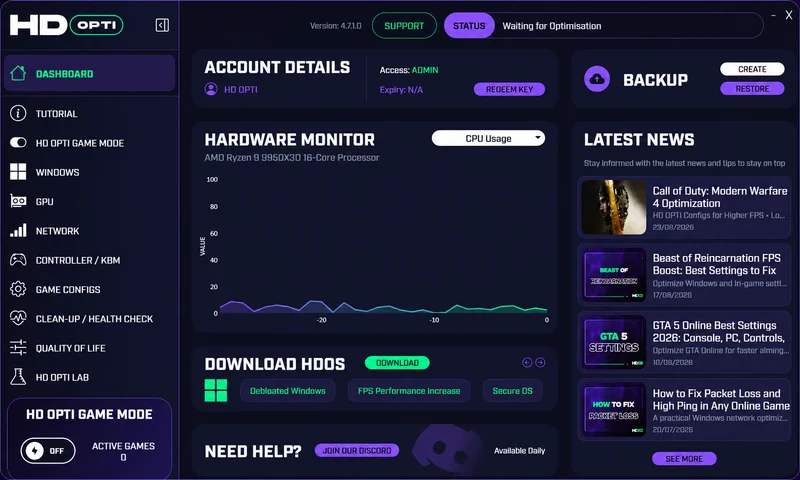
Bring PC settings, game configurations and diagnostic tools into one accessible desktop experience, supported by account access and centrally maintained content.
Developed a branded WPF application using C# and .NET, with dedicated tools for Windows, graphics, networking and input devices, alongside hardware monitoring and Azure service integration.
One desktop application bringing together PC optimisation, game configurations, hardware insights and account-based access, supported by Azure cloud services.
A branded WPF interface with reusable XAML controls, navigation, dialogs and status feedback. The application separates views and view models using an MVVM structure.
Dedicated sections bring together Windows, GPU, network, controller and keyboard/mouse settings, plus a searchable game configuration catalogue. Users can review guidance, apply supported actions and see previous execution details.
CPU and GPU usage monitoring sits alongside PC specifications, USB device inspection and controller polling tools, giving users several ways to understand their hardware.
Sign-in, registration, password recovery and key activation support the account journey. Access levels determine which actions are available, with preview states for restricted features.
Azure Blob Storage supplies scripts, configuration data, news and download information. Azure Function Apps and Cosmos DB form part of the supporting cloud stack for the application.
Status messages and execution logs make activity visible in the interface. Windows restore-point creation and access to recovery tools sit alongside the optimisation workflow.
Inside the application
Purpose-built Windows tools connect the user interface with local hardware and the services that support the product.
A dedicated Game Mode brings automatic game detection, CPU settings and monitoring status into one focused screen.
Enable Game Mode before launching a supported game so it can detect the running process.
Apply the configured CPU settings when a supported game is detected.
See whether Game Mode is monitoring and which game processes are active.
The WPF client brings together local Windows functionality and cloud services for application content, data and supporting operations.
C#, .NET 8 and WPF provide the Windows client, with reusable XAML styling and an MVVM structure.
Hardware readers, diagnostic services and script execution connect the interface with the PC.
Blob Storage delivers maintained content and files, while Function Apps and Cosmos DB support the wider application.